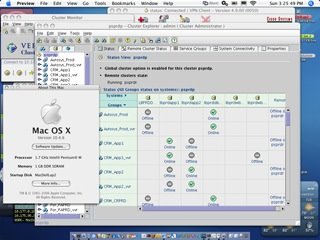
I hacked this together, so I can run the VCS cluster GUI on my Mac, instead of relying on Winbloze. I am almost ready to dump MicroCrap altogether! :-)
I'll be working on the VEA gui, later.
While I prefer command-line, sometimes a GUI is still nice. Especially, in a complex cluster arrangement, such as the one I admin.

Veritas Cluster Manager 4.x in Mac OS XConfiguring the Veritas Cluster Manager to use the Mac OS X using OS X native Java.
1- Copy the Veritas GUI from server (/opt/VRTSvcs/gui) to a location of choice on your Mac.
2- Edit hagui script (this script, below) to reflect the location of VRTSvcs and the path to your JAVA Home
3- Open a terminal and run /path/to/VRTSvcs/hagui
The following is a copy of the modified hagui script (modify to your liking):
**************************************************************
#!/bin/sh
#
# START COPYRIGHT-NOTICE: 1998, 2003
#
# Copyright 1998, 2003 VERITAS Software Corporation.
# All rights reserved.
#
# VERITAS, VERITAS SOFTWARE, the VERITAS logo and all other VERITAS
# product names and slogans are trademarks or registered trademarks
# of VERITAS Software Corporation in the USA and/or other countries.
# Other product names and/or slogans mentioned herein may be trade-
# marks or registered trademarks of their respective companies.
#
# END COPYRIGHT-NOTICE.
#
# change the environment's classpath and
# java_home
#unset JAVA_HOME
#unset CLASSPATH
PATH=".:$PATH"
export PATH
#VCS_HOME="/opt/VRTSvcs"
VCS_HOME="/Users/wallen/VRTSvcs"
#JAVA_HOME=$VCS_HOME/gui/jre
LIB_PATH=$VCS_HOME/gui/lib
LANG_PATH=$VCS_HOME/gui/lang
LD_LIBRARY_PATH=$LIB_PATH
export LD_LIBRARY_PATH
BCLASSPATH=${LANG_PATH}:${LIB_PATH}/VCSGui.jar:${LIB_PATH}/gui_images.jar:${LIB_PATH}/sounds.jar:${LIB_PATH}/VxHelpViewer.jar:${LIB_PATH}/VxHelpViewerl10n.jar
DEBUG=0
if [ "$1" = "-D" ] ; then
DEBUG=1
shift 1
fi
if [ "$#" = 0 ] ; then
if [ "$CSGA_DIR" = "" ] ; then
CONF_PATH=$VCS_HOME/gui/
else
CONF_PATH=$CSGA_DIR
fi
elif [ "$#" = 1 ] ; then
CONF_PATH=$*
shift 1
elif [ "$#" -gt 1 ] ; then
if [ -d "$1" ] ; then
CONF_PATH=$1
shift 1
elif [ "$1" != "-h" ] && [ "$1" != "-p" ] ; then
echo "$1: configuration directory doesn't exist."
exit 1
fi
else
echo "$SELFNAME: configuration directory is incorrect!"
exit 1
fi
CLASSPATH=${CONF_PATH}:$BCLASSPATH:$JAVA_HOME/lib/rt.jar:$JAVA_HOME/lib/i18n.jar
export CLASSPATH
if [ $DEBUG = 0 ] ; then
exec $JAVA_HOME/bin/java -Dbase.dir="/opt/VRTSvcs/gui" -classpath $CLASSPATH -mx128m VCSGui $* > /dev/null
else
exec $JAVA_HOME/bin/java -Dbase.dir="/opt/VRTSvcs/gui" -classpath $CLASSPATH -mx128m VCSGui $*
fi