Silly Mac OSX.
Clean up memory cache easily this way:
Add the following entry in your root's crontab:
# Clean up memory
30 * * * * /usr/sbin/purge &
Use at your own risk, but I have not had issues with it.
If you don't know how to update your root crontab, well, then you have no business running this. Use some 3rd party graphical app or something to clean up.
FYI: Some people are having issue with Chrome and Flash and other programs not "letting go" of reserved memory, after use. This will help alleviate the issue. Developers are arguing over it's use, claiming memory management is just fine in OS X 10 Mavericks and later. I beg to differ as I have seen memory run out several times myself with using Chrome web browser and it not letting resources go.
You can read more about it, here:
http://osxdaily.com/2013/11/14/use-purge-command-os-x-mavericks/
Showing posts with label mac. Show all posts
Showing posts with label mac. Show all posts
Tuesday, December 02, 2014


Saturday, September 09, 2006
How to restart the OSX Desktop...
Without loging out and back in.
Useful for when desktop "freezes" or you have artifacts (see Macbook) and don't want to kill off background processes.
1. Open up term app
2. ps -aux|grep Graphics
3. Find the following:
windowse 52 0.9 5.6 915688 57592 ?? Ss 11:02AM 0:20.62 /System/Library/Frameworks/ApplicationServices.framework/Frameworks/CoreGraphics.framework/Resources/WindowServer -daemon
4. then HUP the found process:
sudo kill -HUP 52
52 is the process id tht I found. Yours will be different.
This will restart the GUI, logging you out, but at least you won't have to reboot the whole machine.
Useful for when desktop "freezes" or you have artifacts (see Macbook) and don't want to kill off background processes.
1. Open up term app
2. ps -aux|grep Graphics
3. Find the following:
windowse 52 0.9 5.6 915688 57592 ?? Ss 11:02AM 0:20.62 /System/Library/Frameworks/ApplicationServices.framework/Frameworks/CoreGraphics.framework/Resources/WindowServer -daemon
4. then HUP the found process:
sudo kill -HUP 52
52 is the process id tht I found. Yours will be different.
This will restart the GUI, logging you out, but at least you won't have to reboot the whole machine.
Sunday, September 03, 2006
Veritas Cluster GUI 4.x in OSX howto
I hacked this together, so I can run the VCS cluster GUI on my Mac, instead of relying on Winbloze. I am almost ready to dump MicroCrap altogether! :-)
I'll be working on the VEA gui, later.
While I prefer command-line, sometimes a GUI is still nice. Especially, in a complex cluster arrangement, such as the one I admin.

Veritas Cluster Manager 4.x in Mac OS X
Configuring the Veritas Cluster Manager to use the Mac OS X using OS X native Java.
1- Copy the Veritas GUI from server (/opt/VRTSvcs/gui) to a location of choice on your Mac.
2- Edit hagui script (this script, below) to reflect the location of VRTSvcs and the path to your JAVA Home
3- Open a terminal and run /path/to/VRTSvcs/hagui
The following is a copy of the modified hagui script (modify to your liking):
**************************************************************
#!/bin/sh
#
# START COPYRIGHT-NOTICE: 1998, 2003
#
# Copyright 1998, 2003 VERITAS Software Corporation.
# All rights reserved.
#
# VERITAS, VERITAS SOFTWARE, the VERITAS logo and all other VERITAS
# product names and slogans are trademarks or registered trademarks
# of VERITAS Software Corporation in the USA and/or other countries.
# Other product names and/or slogans mentioned herein may be trade-
# marks or registered trademarks of their respective companies.
#
# END COPYRIGHT-NOTICE.
#
# change the environment's classpath and
# java_home
#unset JAVA_HOME
#unset CLASSPATH
PATH=".:$PATH"
export PATH
#VCS_HOME="/opt/VRTSvcs"
VCS_HOME="/Users/wallen/VRTSvcs"
#JAVA_HOME=$VCS_HOME/gui/jre
LIB_PATH=$VCS_HOME/gui/lib
LANG_PATH=$VCS_HOME/gui/lang
LD_LIBRARY_PATH=$LIB_PATH
export LD_LIBRARY_PATH
BCLASSPATH=${LANG_PATH}:${LIB_PATH}/VCSGui.jar:${LIB_PATH}/gui_images.jar:${LIB_PATH}/sounds.jar:${LIB_PATH}/VxHelpViewer.jar:${LIB_PATH}/VxHelpViewerl10n.jar
DEBUG=0
if [ "$1" = "-D" ] ; then
DEBUG=1
shift 1
fi
if [ "$#" = 0 ] ; then
if [ "$CSGA_DIR" = "" ] ; then
CONF_PATH=$VCS_HOME/gui/
else
CONF_PATH=$CSGA_DIR
fi
elif [ "$#" = 1 ] ; then
CONF_PATH=$*
shift 1
elif [ "$#" -gt 1 ] ; then
if [ -d "$1" ] ; then
CONF_PATH=$1
shift 1
elif [ "$1" != "-h" ] && [ "$1" != "-p" ] ; then
echo "$1: configuration directory doesn't exist."
exit 1
fi
else
echo "$SELFNAME: configuration directory is incorrect!"
exit 1
fi
CLASSPATH=${CONF_PATH}:$BCLASSPATH:$JAVA_HOME/lib/rt.jar:$JAVA_HOME/lib/i18n.jar
export CLASSPATH
if [ $DEBUG = 0 ] ; then
exec $JAVA_HOME/bin/java -Dbase.dir="/opt/VRTSvcs/gui" -classpath $CLASSPATH -mx128m VCSGui $* > /dev/null
else
exec $JAVA_HOME/bin/java -Dbase.dir="/opt/VRTSvcs/gui" -classpath $CLASSPATH -mx128m VCSGui $*
fi
I'll be working on the VEA gui, later.
While I prefer command-line, sometimes a GUI is still nice. Especially, in a complex cluster arrangement, such as the one I admin.
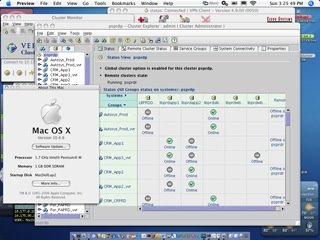
Veritas Cluster Manager 4.x in Mac OS X
Configuring the Veritas Cluster Manager to use the Mac OS X using OS X native Java.
1- Copy the Veritas GUI from server (/opt/VRTSvcs/gui) to a location of choice on your Mac.
2- Edit hagui script (this script, below) to reflect the location of VRTSvcs and the path to your JAVA Home
3- Open a terminal and run /path/to/VRTSvcs/hagui
The following is a copy of the modified hagui script (modify to your liking):
**************************************************************
#!/bin/sh
#
# START COPYRIGHT-NOTICE: 1998, 2003
#
# Copyright 1998, 2003 VERITAS Software Corporation.
# All rights reserved.
#
# VERITAS, VERITAS SOFTWARE, the VERITAS logo and all other VERITAS
# product names and slogans are trademarks or registered trademarks
# of VERITAS Software Corporation in the USA and/or other countries.
# Other product names and/or slogans mentioned herein may be trade-
# marks or registered trademarks of their respective companies.
#
# END COPYRIGHT-NOTICE.
#
# change the environment's classpath and
# java_home
#unset JAVA_HOME
#unset CLASSPATH
PATH=".:$PATH"
export PATH
#VCS_HOME="/opt/VRTSvcs"
VCS_HOME="/Users/wallen/VRTSvcs"
#JAVA_HOME=$VCS_HOME/gui/jre
LIB_PATH=$VCS_HOME/gui/lib
LANG_PATH=$VCS_HOME/gui/lang
LD_LIBRARY_PATH=$LIB_PATH
export LD_LIBRARY_PATH
BCLASSPATH=${LANG_PATH}:${LIB_PATH}/VCSGui.jar:${LIB_PATH}/gui_images.jar:${LIB_PATH}/sounds.jar:${LIB_PATH}/VxHelpViewer.jar:${LIB_PATH}/VxHelpViewerl10n.jar
DEBUG=0
if [ "$1" = "-D" ] ; then
DEBUG=1
shift 1
fi
if [ "$#" = 0 ] ; then
if [ "$CSGA_DIR" = "" ] ; then
CONF_PATH=$VCS_HOME/gui/
else
CONF_PATH=$CSGA_DIR
fi
elif [ "$#" = 1 ] ; then
CONF_PATH=$*
shift 1
elif [ "$#" -gt 1 ] ; then
if [ -d "$1" ] ; then
CONF_PATH=$1
shift 1
elif [ "$1" != "-h" ] && [ "$1" != "-p" ] ; then
echo "$1: configuration directory doesn't exist."
exit 1
fi
else
echo "$SELFNAME: configuration directory is incorrect!"
exit 1
fi
CLASSPATH=${CONF_PATH}:$BCLASSPATH:$JAVA_HOME/lib/rt.jar:$JAVA_HOME/lib/i18n.jar
export CLASSPATH
if [ $DEBUG = 0 ] ; then
exec $JAVA_HOME/bin/java -Dbase.dir="/opt/VRTSvcs/gui" -classpath $CLASSPATH -mx128m VCSGui $* > /dev/null
else
exec $JAVA_HOME/bin/java -Dbase.dir="/opt/VRTSvcs/gui" -classpath $CLASSPATH -mx128m VCSGui $*
fi
Subscribe to:
Posts (Atom)